AI Layer
Extractor
Layera is an AI-powered tool that converts flat, AI-generated images into editable layers you can export to Figma or PPT.
No more hours of manual masking, pen tools, or recreating layers by hand. Just upload, extract, and export.
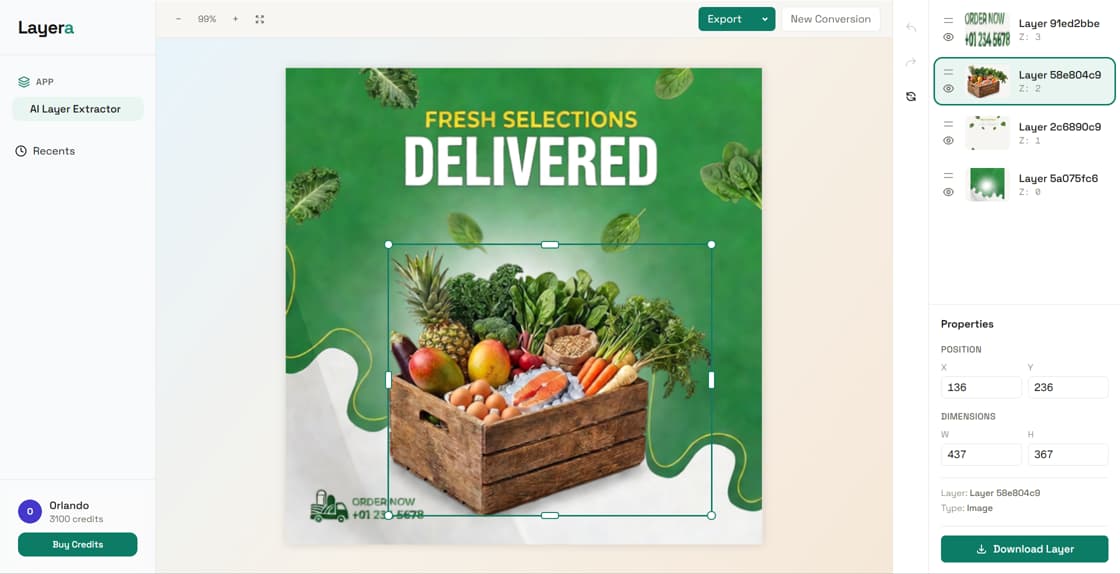
Three steps to editable layers
From flat AI image to layered design file, in seconds.
Upload your AI image
Drop any AI-generated image in PNG, JPG, or WebP. Works with ChatGPT, Midjourney, Gemini, and other generators.
AI extracts layers
Advanced AI identifies and separates design elements into individual, editable layers in seconds.
Export anywhere
Download as Figma or PPT. Or import directly with our Figma plugin.
See it in action
More than background removal
A background remover splits an image into two pieces. Layera decomposes the whole scene into a working layer stack, so every element stays separately editable. That is the difference between getting a cutout and getting a starting point you can actually design in.
Every element, its own layer
Text overlays, subjects, objects, and backgrounds become distinct layers instead of one foreground cutout.
Review layers before export
Hide or show layers in the editor to check exactly what the AI separated before you download anything.
Ready for real design work
Move a headline, swap an object, or restyle a background without affecting the rest of the image.
Built for designers who work with AI
Multi-format export
Export to Figma or PowerPoint. Your layers, in your preferred tool.
Figma plugin
Import layers directly into Figma with our community plugin. No file download needed.
AI-powered precision
Advanced AI separates text, objects, and backgrounds into clean, editable layers.
Instant processing
Get your layered file in seconds, not hours. No manual tracing required.
Figma, PowerPoint, or ZIP: pick your export
Every layer arrives as a separate, named element in the format your workflow already uses. You can select several formats for the same conversion and download them together.
Figma
Export a Figma file with each element on its own layer, or send layers straight into Figma with the community plugin.
PowerPoint
Each layer arrives as a separate slide object, ready for decks and quick edits in your Office workflow.
ZIP of layer images
Download every layer as an image in a single archive, named by stacking order, for use in any tool.
Made for the way you create
UI/UX designers
Creating mockups and prototypes with AI-generated visuals. Extract individual elements and compose them directly in Figma.
- Go from flat AI image to editable Figma file
- Move, resize, or reuse each element independently
- Deliver professional layered files to clients
Marketing creatives
Making ads, banners, and social media content with AI art. Swap text, resize elements, and adapt for different channels without starting over.
- Quickly adapt AI art for ads, banners, and thumbnails
- Edit text and elements independently
- Produce more content in less time
Which images extract best?
Layera is built for AI-generated images, and most of them extract cleanly. Here is what to expect from your uploads.
AI-generated scenes
Images from ChatGPT, Midjourney, or Gemini with a clear subject and distinct objects separate best. That is exactly what Layera is tuned for.
Posters and UI mockups
Headlines, buttons, and graphics in AI-generated layouts land on their own layers, so you can edit them without touching the background.
Marketing visuals
Product shots, banners, and thumbnails where you need to swap text or elements for each channel, instead of starting over.
Honest limits: photographs with very fine hair, motion blur, or semi-transparent materials are harder for any AI segmentation, and extracted edges may need touch-up in your design tool. Layera shows every separated layer in the editor before export, so you always know what you are getting.
Simple, transparent pricing
Buy once, use anytime. No subscription needed.
Frequently asked questions
What is an AI layer extractor?+
An AI layer extractor uses artificial intelligence to automatically separate a flat image into individual editable layers. It analyzes image content, identifies distinct elements like text, objects, and backgrounds, and creates separate layers for each. Layera is designed specifically for AI-generated images from ChatGPT, Midjourney, and Gemini.
How does AI divide images into layers?+
Layera uses advanced AI models to analyze your image and identify distinct visual elements. The AI segments the image into semantic layers, such as text overlays, foreground subjects, background elements, and decorative details. Each element becomes a separate editable layer you can modify independently.
Are these the original layers from the design file?+
No. A flat JPG or PNG contains no layer data, so no tool can recover the exact original file. Layera's AI analyzes the image and reconstructs a clean set of editable layers, which you can review and adjust in the editor before exporting.
What image formats are supported?+
Layera supports PNG, JPG, JPEG, and WebP formats. You can upload images up to 10MB. The extracted layers export to Figma, PowerPoint, or a ZIP archive of layer images.
How accurate is the AI layer extraction?+
Layera provides high-quality layer separation that works well for most AI-generated images. The extracted layers are suitable for editing and iteration. For pixel-perfect production work, some manual refinement may still be needed.
Can I adjust layers before exporting?+
Yes. Every conversion opens in the Layera editor, where you can hide or show layers, move and resize them, and undo any change before exporting to Figma, PowerPoint, or ZIP.
Can I export to Figma?+
Yes. Layera exports to Figma and PowerPoint, or downloads all layers as a ZIP archive. You can also use the Layera Figma plugin to import layers directly into your Figma workspace.
How much does Layera cost?+
Layera uses a pay-per-use credit system with no subscription. Starter is $1 for 80 credits, Basic is $9 for 1,000 credits, and Pro is $29 for 3,400 credits. Credits never expire.
Is Layera free to try?+
Yes. New accounts get free credits, enough for one full image-to-layers conversion, with no credit card required. If you need more, credit packs start at $1 and never expire.
Is my image data safe?+
Yes. You retain full ownership of all uploaded images. Layera processes images securely and does not use them for model training or share them with third parties.
Ready to extract editable layers?
Upload your first AI-generated image and get a layered design file in seconds.