AI Layer Extractor: How to Divide AI-Generated Images into Editable Layers
The Problem with AI-Generated Images
AI image generators like ChatGPT, Midjourney, and Gemini produce stunning visuals. But they output flat, raster images. Every element, from the background to the text to the foreground subject, is merged into a single layer.
For designers who need to edit, rearrange, or refine these images, that means hours of manual work. You trace elements, cut out objects, rebuild text layers, and recreate the composition in Figma or Photoshop.
What Is an AI Layer Extractor?
An AI layer extractor is a tool that uses computer vision and machine learning to analyze a flat image and separate it into distinct, editable layers. Instead of manually tracing each element, the AI identifies visual boundaries between objects, text, backgrounds, and decorative elements, then creates individual layers for each.
This is particularly useful for AI-generated images, which often have complex compositions with overlapping elements that would be tedious to divide by hand.
Step-by-Step: Extracting Layers with Layera
Layera is an AI layer extractor built specifically for AI-generated images.
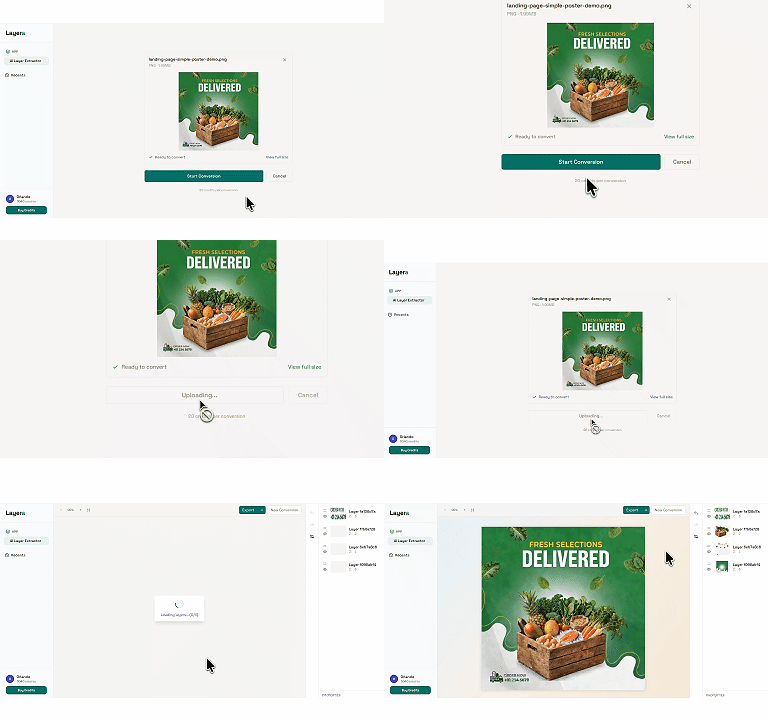
Step 1: Upload your image
Export your AI image (PNG, JPG, or WebP, up to 10MB) and upload it to Layera. It works with images from any generator: ChatGPT, Midjourney, Gemini, or others.
Step 2: AI extracts layers
Layera processes the image and divides it into editable layers. The AI identifies text elements, foreground subjects, background layers, and decorative components.
Step 3: Export to your tool
Take the extracted layers into your tool of choice:
- PowerPoint (PPT) — download a ready-to-edit presentation file
- Figma — use the Layera Figma plugin to import the layers directly into Figma, no download needed
Who Uses an AI Layer Extractor?
For AIGC Designers
- Refine AI-generated concepts in Figma without manual tracing
- Swap out individual elements while keeping the rest of the composition
- Deliver professional, layered files to clients
For Social Media Content Creators
- Adapt a single AI image across different social platforms by rearranging layers
- Edit text overlays without regenerating the entire image
- Resize and reformat content for different aspect ratios
For Marketing Teams
- Update branding elements across AI-generated marketing visuals
- Localize AI-generated content by swapping text layers
- Create template variations from a single AI-generated concept
Tips for Best Results
-
Use high-resolution source images. Images with clear visual boundaries between elements produce the cleanest layer separation.
-
Avoid overly abstract AI images. Images with clear subjects, distinct text, and defined backgrounds work best.
-
Export in PNG when possible. PNG preserves quality better than JPG, giving the AI cleaner data to work with.
-
Iterate on results. Use the extracted layers as a starting point, then refine individual elements in your design tool.
Getting Started
Layera offers a pay-per-use credit system with no subscription. Credits never expire. Try it.
FAQ
What is an AI layer extractor?
An AI layer extractor is a tool that uses computer vision and machine learning to analyze a flat image and divide it into distinct, editable layers — separating text, subjects, backgrounds, and decorative elements automatically.
Is AI layer extraction accurate enough for production work?
AI-extracted layers are a strong starting point for iteration and refinement. For pixel-perfect production work, expect to fine-tune individual layers in your design tool afterwards.
How much does an AI layer extractor cost?
Layera uses pay-per-use credits with no subscription. The Starter pack is $1 for 80 credits (about 4 image conversions), and credits never expire.
Related Posts
Ready to extract editable layers?
Upload any AI-generated image and get a layered design file in seconds.